Product Support

Hybrid Support

Getting started, FAQs, manuals, and warranty details for the Hybrid laser rangefinder + GPS (product #201835).

Shop the Tour Hybrid
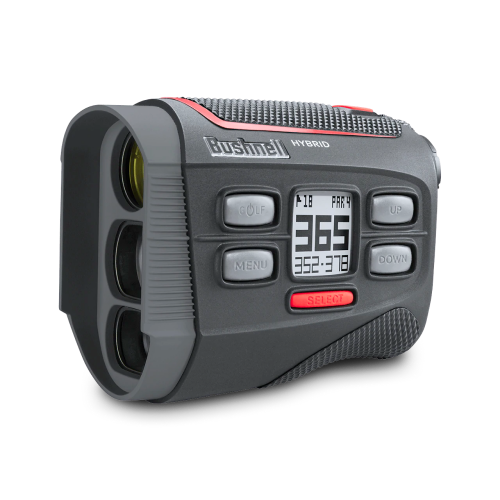
Bushnell Hybrid Laser Rangefinder Support

Getting Started

Two minutes of setup before your first round.

Before use

Register your device at bushnellgolf.com/product-registration for Bushnell Golf support, product discounts, and new product information.

Next, install the Bushnell Golf App (Android / Apple).

Open the Bushnell Golf App and add your rangefinder as a device:

  • The first field is the serial number from the bottom of the device.
  • The second field is the manufacture date (also on the bottom of the rangefinder), in YYYYMM format.
  • If you get an error that the serial number is already in use, email iGolf at support@l1inc.com to request the serial number be released (include your serial number).

Basic operation

Registration through the Golf App also creates your user ID and password at the Bushnell iGolf website (bushnell.igolf.com), which is where you'll get software and course updates for the GPS features.

The Hybrid uses two batteries. Replace the CR-2 3-volt lithium battery for the laser rangefinding functions when the unit won't turn on, the display doesn't illuminate, or it goes blank when firing the laser. Use a high-quality (Panasonic, Duracell, or Energizer) battery straight from the package, and carry 1-2 spares in your bag so you always have a fresh battery for full functionality.

Guides & Manuals

PDF downloads open in a new tab.

Hybrid User Manual

The Hybrid combines a laser rangefinder and GPS in a single device for the best of both. This owner's manual covers setup, features, settings, and care.

Download PDF

Hybrid Quick Start Guide

The Hybrid combines a laser rangefinder and GPS in a single device for the best of both. This quick start guide walks you through setup and your first round.

Download PDF
2 years Warranty

Bushnell Golf guarantees the Hybrid Laser Rangefinder + GPS to be free of defects in materials and workmanship for two years from the date of purchase. This warranty does not cover consumer-caused damages such as misuse, abuse or repairs attempted by someone other than our authorized technicians.

Warranty & Service Center →

FAQs

Troubleshooting and care, answered. Still stuck? The contact options below reach a real Bushnell Golf expert.

I see debris in the lens
This is likely solar burn — over time the device can develop small dots from sun exposure. The dots are cosmetic and should not affect performance. If solar burn becomes substantial enough to interfere with the viewing area, contact Bushnell Golf Support for options.
I have an error code and can't find any courses?
Hybrid Software Reload
The error code indicates that your devices operating system has been corrupted. Most of the time it is from the device being disconnected from the cable without safely ejecting the device from your computer's operating system. 
If you have installed the Bushnell Golf App, you are already registered at the Bushnell iGolf website. If not, please complete the registration process as you will need access to this site to update the software. https://bushnell.igolf.com/
Hybrid Format & Reload Software Instructions 

• Connect your device to the computer and locate the corresponding USB drive using File Explorer.

• The USB device should show up as Bushnell and a Drive Letter (like (E:, F:, etc.)

• On windows, right-click the USB drive then click on "format".

• Download the hybrid2.stp file by using the below link to your computer or directly to the now formatted USB drive.  (be sure the file is named exactly hybrid2.stp)

hybrid2.stp download

• Visit  https://bushnell.igolf.com/  and log in to your account.

• Connect your device. The website should automatically pop up saying a firmware update is available. Follow the steps per the website to perform the update. This will download any missing files onto the device and ensure it is in working order.  The update process can take up to 45 minutes. (see attached update device document)

• Right click the device in File Explorer and choose "Safely Eject or Eject"

• Remove the device from the computer

• Power up and test the device. *Please ensure that you are outside when you test the device to access GPS signals.
My Hybrid is off by 10 yards?
The Hybrid can be used to measure distance in yards or meters. The unit measure indicators are located in the lower right portion of the LCD. To select between yards and meters (starting with the unit powered off), press and hold the Power/Fire button. After 7 seconds, the display will begin to cycle through the options: Yards or meters. When the units you want are displayed, release the Power/Fire button to select it. Y for Yards or M for Meters. The Hybrid will return to the last unit of measure setting used each time the unit is turned on.
The display is out of focus
Power the unit on by pressing the Power/Fire button once, then rotate the eyepiece in either direction until the display icons and numbers are in focus.
Is the Hybrid Waterproof?
No, the Hybrid is IPX4 rated and resistant against water splashes from any direction. It is not fully waterproof and should not be submerged in water at any depth or exposed to heavy rain or other direct streams of water. Damage caused by water is not covered under the two-year limited warranty.
Can I clean the Hybrid?
You may clean the unit occasionally with a soft, damp cloth. Do not expose the unit to strong chemicals such as gasoline and alcohol, as they will damage the unit. Store the unit in a dry place when it is not in use.
Can I replace the battery?
The Hybrid uses two batteries. You may replace the battery for the laser rangefinding functions of the Hybrid when the unit does not turn on, display does not illuminate, or the display goes blank when attempting to power the laser. Use a good quality 3 -volt lithium battery (CR2). Insert into the compartment with the negative (flat) end first (positive end facing out towards the battery cover).
We recommend replacing the battery at least once every six months. The GPS function of the Hybrid uses an internal rechargeable lithium battery that may not be changed. Do not attempt to open the device. If you suspect a problem with the GPS battery, please contact Bushnell Golf support. Opening the device will void the warranty.

Videos

HYBRID RANGEFINDER + GPS INTRODUCTION

HYBRID RANGEFINDER + GPS INTRODUCTION

See distance like never before with the Bushnell Hybrid Laser Rangefinder and GPS combo unit with a fully integrated display featuring both laser and GPS yardages.
HYBRID RANGEFINDER + GPS OVERVIEW

HYBRID RANGEFINDER + GPS OVERVIEW

Bushnell Golf has been the leading innovator in Golf Measuring Devices for over 20 years and is now bringing Laser and GPS technologies together like never before with the Hybrid.

Replacement Parts

Replacement Parts
REPLACEMENT EYE CUP FOR TOUR V4, TOUR V4 SHIFT, OR HYBRID
Official replacement eye cup for the Tour V4, Tour V4 Shift or Hybrid.

Warranty & Service

Check coverage, request a warranty evaluation, or track a service.

Warranty center

Talk to an expert

Can't find what you need? Our support team replies within 24–48 hours.

Contact us

Legacy product manuals

Own an older Bushnell Golf device? Every manual, in one library.

Browse manuals