

Product Support
Pro XE Support
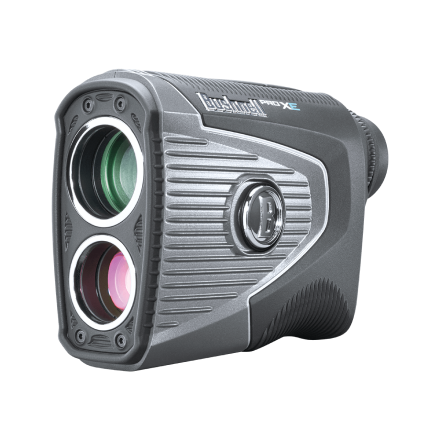
Getting started, FAQs, manuals, and warranty details for the Pro XE laser rangefinder (product #201950).
Getting Started
Two minutes of setup before your first round.
Guides & Manuals
PDF downloads open in a new tab.
Pro XE User Manual
The Pro XE combines Slope, BITE, and Elements barometer and temperature readings for precise distances. This owner's manual covers setup, features, settings, and care.
Download PDFPro XE Quick Start Guide
The Pro XE combines Slope, BITE, and Elements barometer and temperature readings for precise distances. This quick start guide walks you through setup and your first round.
Download PDF
2 years Warranty
FAQs
Troubleshooting and care, answered. Still stuck? The contact options below reach a real Bushnell Golf expert.
I see debris in the lens
This is likely solar burn — over time the device can develop small dots from sun exposure. The dots are cosmetic and should not affect performance. If solar burn becomes substantial enough to interfere with the viewing area, contact Bushnell Golf Support for options.
I do not feel or see the Jolt feature.
Pro XE JOLT
For your reference on expected performance, below is a direct link to the manual for your device. Page 4 describes the expected operation of the Pro XE. Page 5 describes the expected operation of the Pinseeker with Visual Jolt.
Pro XE Product Manual
The Pro XE rangefinder does JOLT/Visual JOLT less frequently than previous generation rangefinders. The Pro XE locking feature is so precise and powerful, it often does not get enough background feedback/noise to cause the unit to "JOLT/visually JOLT". When the course has prisms or reflectors on their flags, the Pro XE will lock on very quickly and may not JOLT very often.
If you want to confirm you have the flag please keep the fire button pressed down and slowly pan away from the flag. You should feel and see the Jolt confirmation.
For your reference on expected performance, below is a direct link to the manual for your device. Page 4 describes the expected operation of the Pro XE. Page 5 describes the expected operation of the Pinseeker with Visual Jolt.
Pro XE Product Manual
The Pro XE rangefinder does JOLT/Visual JOLT less frequently than previous generation rangefinders. The Pro XE locking feature is so precise and powerful, it often does not get enough background feedback/noise to cause the unit to "JOLT/visually JOLT". When the course has prisms or reflectors on their flags, the Pro XE will lock on very quickly and may not JOLT very often.
If you want to confirm you have the flag please keep the fire button pressed down and slowly pan away from the flag. You should feel and see the Jolt confirmation.
The display is too faint?
The display has 4 levels of brightness you can choose from. To change the brightness level press and hold the mode button on top of the Xe next to the power button. Keep holding the mode button until it starts cycling through the brightness levels. "Bright 1 to Bright 4". When your preferred setting is displayed, press the power/fire button.
My Pro XE is off by 10 yards?
The Pro XE can be used to measure distance in yards or meters. The unit measure indicators are located in the lower right portion of the LCD. To select between yards and meters, press and hold the Mode button which is next to the Power button. Press the Power/Fire button to confirm your units preference and exit the Settings menu. The Pro Xe will return to the last unit of measure setting used each time the unit is turned on.
The display is out of focus
Power the unit on by pressing the Power/Fire button once, then rotate the eyepiece in either direction until the display icons and numbers are in focus.
Is the Pro XE Waterproof?
Yes, the Pro XE is manufactured and tested to withstand water exposure up to IPX7 standards. It is waterproof, submersible to a depth of 1 meter for up to 30 minutes.
Can I clean the Pro XE?
Yes, follow these steps.
1. Blow away any excessive dust or debris on exterior (or use a soft brush).
2. To remove dirt or finger prints, clean with the supplied micro fiber cloth rubbing in a circular motion. Use of a coarse cloth or unnecessary rubbing may scratch the lens surface and eventually cause permanent damage. The included washable microfiber cleaning cloth is ideal for the routine cleaning of your optics. Simply breathe lightly on the lens to provide a slight amount of moisture, then gently rub the lens with the microfiber cloth.
3. For a more thorough cleaning, photographic lens tissue and photographic-type lens cleaning fluid or isopropyl alcohol may be used. Always apply fluid to the cleaning cloth - never directly on the lens.
1. Blow away any excessive dust or debris on exterior (or use a soft brush).
2. To remove dirt or finger prints, clean with the supplied micro fiber cloth rubbing in a circular motion. Use of a coarse cloth or unnecessary rubbing may scratch the lens surface and eventually cause permanent damage. The included washable microfiber cleaning cloth is ideal for the routine cleaning of your optics. Simply breathe lightly on the lens to provide a slight amount of moisture, then gently rub the lens with the microfiber cloth.
3. For a more thorough cleaning, photographic lens tissue and photographic-type lens cleaning fluid or isopropyl alcohol may be used. Always apply fluid to the cleaning cloth - never directly on the lens.
When do I replace the battery?
Replace the battery when the unit won't turn on, the display doesn't illuminate, or the display goes blank when firing the laser. Use a quality CR2 3-volt lithium battery, inserted negative (flat) end first. We recommend replacing the battery at least every six months.
Videos

DISCOVER THE PRO XE
Get an overview of the Pro XE and its features.
Legacy product manuals
Own an older Bushnell Golf device? Every manual, in one library.
Browse manuals